

Bramble for Chrome
A porn blocker that holds in Chrome.
Protection that travels with you. The phone is not the only place this lives. A lot of men look at a laptop and tell themselves the phone is the problem. It isn’t.
Add to Chrome
Works in Chrome, Edge, Brave, and ChromeOS.
It pairs with Bramble for iPhone. Android is coming soon.
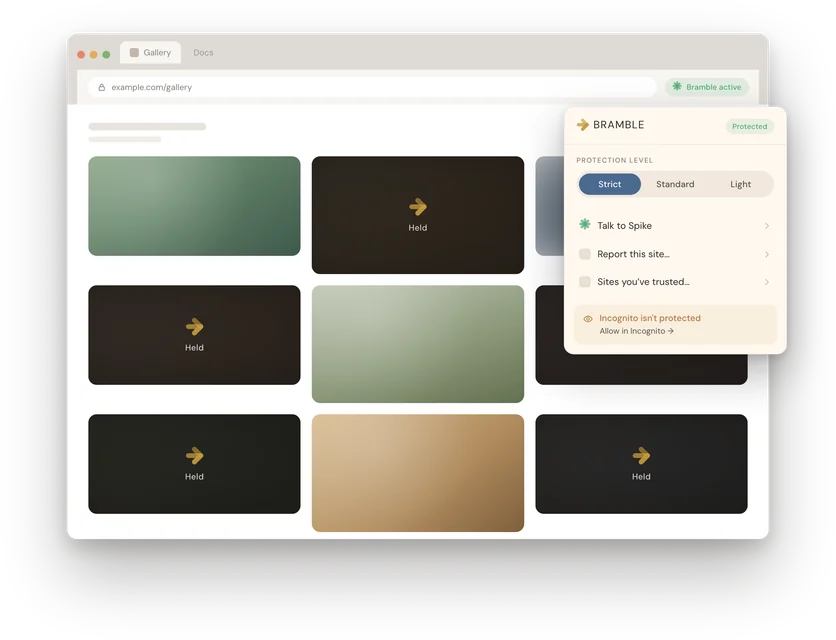
Following, not Explore. Pictures that would pull go soft as they pass. Then the day has an end.

What it does.
Holds sites before they load.
Pornographic and high-risk sites are held before they load, from a list that keeps being updated — more than 1.2 million domains.
Filters images and video on the page.
An on-device model in the browser clears what it can. If it cannot reach a confident verdict, the image’s web address — or a few sampled frames of the video — goes to Bramble for a second opinion. The text of the page is never sent.
Steers out of the feeds.
Instagram Explore and Reels, TikTok’s For You, X’s Explore, Reddit’s r/all and r/popular, and Tumblr’s Explore redirect to the followed or home view. Those surfaces push explicit content. A following feed has an end. The other kind does not. Setting protection to Permissive turns this off.
Holds the quieter bypasses too.
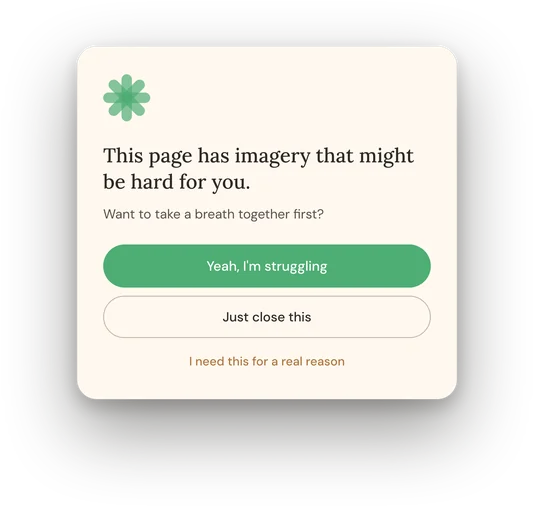
SafeSearch stays on. DNS-over-HTTPS resolver bypasses are held. A held page becomes a moment to breathe, and a doorway back to the Bramble app on your phone.
How it sits with the iPhone app.
Bramble for Chrome pairs with the iPhone app. You confirm the pairing from your own phone — no passwords typed into the extension. Your Keyholder is told about coverage, never your browsing. Signals about what was held are hashed on the device.
If you remove the extension while it is paired, it stops checking in, and your phone notices — so your Keyholder, if you have one, can be told this screen is no longer covered.
The rest of Bramble stays what it is: a two-minute check-in, brothers who can witness it, honesty about what you feel, and the power of God. The extension holds the door. It does not do the growing for you.
What it will not be.
Not a screenshot tool. Not a lock you hide from the people who love you. Not a replacement for the work. Protections without closeness is just a quieter way to stay stuck.
A browser extension can be turned off in two clicks. Bramble on Chrome is friction and witness, not a cage. It works best paired with the iPhone app and the people who walk with you.
Protections that hold on the computer you work on. Same quiet philosophy. Free — for now we send the installer by email.
The daily work, your group and all four layers of protection live on iPhone.
Not ready to download? Take the two-minute reflection.
Honest answers.
Is the Chrome extension available now?
Yes. Add it from the Chrome Web Store. It holds in Chrome, Edge, Brave, and ChromeOS.
Does it send my browsing history?
Page addresses stay on the device. Your Keyholder is told about coverage, never your tabs. If the on-device image model is unsure, the image’s web address or a few sampled video frames go to Bramble for a second opinion. The text of the page is never sent. The details live in the privacy policy, and the extension has its own.
Will it work in Brave or Edge?
Yes. Chrome, Edge, Brave, and ChromeOS.
Do I need the iPhone app?
The extension pairs with the iPhone app. You confirm that pairing from your phone — no passwords typed into the extension. The daily work and your group live there. You can add the extension now. Download the iPhone app if you want it.
Can it be turned off?
Yes. Two clicks. That is the honest shape of a browser extension. Friction and witness, not a cage.